
Free Printable Calendar – Customize, Download & Print
Create your own free printable calendar in just a few clicks. Choose a month and year, change the colors and download your calendar as a PDF or PNG. You can also print it directly from your browser.
Our printable calendar maker helps you plan your days, organize tasks and keep track of important dates. Whether you need a calendar for school, work, home, or personal use, you can create one that fits your needs.
What Is a Printable Calendar?
A printable calendar is a calendar you can download and print on paper. It helps you organize appointments, meetings, events and daily activities without using a digital planning app.
With Print Calendar Free, you can create monthly or yearly calendars online. Choose your preferred layout, customize the design and prepare your calendar for printing.
How to Create a Printable Calendar
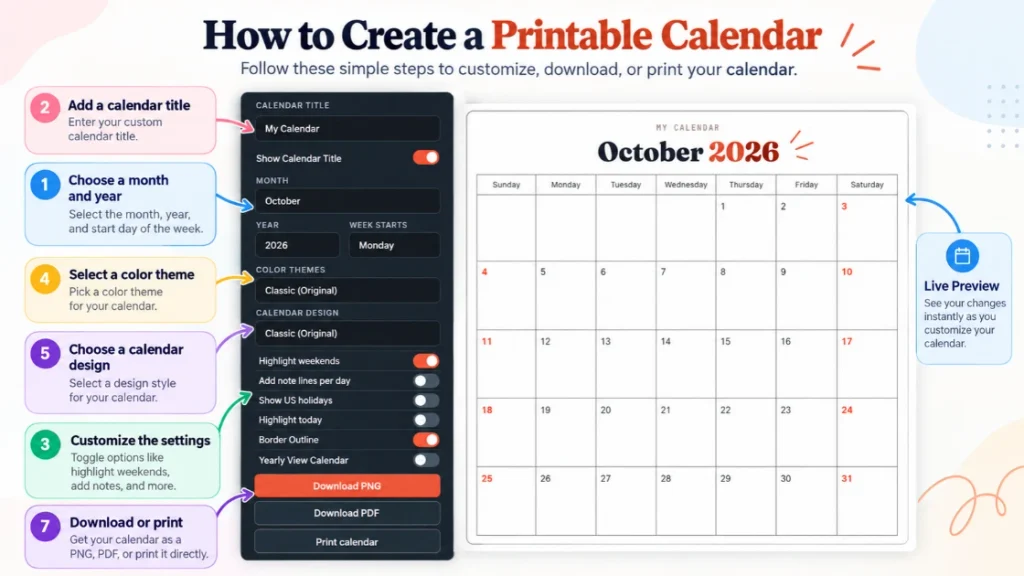
Making your own calendar is easy. Follow these steps:
- Choose a month and year. Select any past or future month and year, such as 2026, 2030, 2050 or 2100.
- Add a calendar title. Enter your own title or hide it using the On/Off option.
- Customize the settings. Choose the first day of the week, highlight weekends or show US holidays.
- Select a color theme. Pick a color that matches your style.
- Choose a calendar design. Select your favorite template from 20 different designs.
- Choose a calendar view. Use Monthly View or turn on Yearly View to see all 12 months.
- Download or print. Save your calendar as a PDF or PNG or print it directly.
How to Use Our Free Printable Calendar – Video Tutorial
Watch this step-by-step video tutorial to learn how to customize your calendar, choose a month or year, add holidays and download or print your calendar as a PDF or PNG.
Printable Monthly Calendar
A printable monthly calendar lets you view one month at a time. It gives you space to plan activities, write reminders and organize your schedule.
You can choose any month and year, starting the week on Monday or Sunday. You can also turn on note lines to leave space for handwritten reminders.
This calendar is useful for students, teachers, office workers and families.
Free Yearly Printable Calendar
Want to plan the whole year? Turn on Yearly View to see all 12 months, from January to December, on one page.
This view helps you plan holidays, birthdays, school schedules and important events in advance.
Download a Printable Calendar PDF or PNG
You can save your calendar in two formats:
PDF Format: A printable calendar PDF is useful when you want to save or print your calendar on A4 paper.
PNG Format: Download your calendar as an image. You can save it, share it, or print it later.
You can also click Print Calendar to open your browser’s print window and print your calendar directly.
Quick Download: Click anywhere on the calendar preview to open a menu with three options: Download PNG, Download PDF and Print Calendar. Simply choose the option you need.
Customize Your Calendar
Make your calendar simple, colorful, or creative with our easy customization options. You can change its appearance to match your personal style or planning needs.
Want a clean calendar for work? Choose a simple design. Making a calendar for your family or classroom? Try a colorful template.
You can highlight weekends to make them easier to see, add note lines for writing reminders or display US holidays to help plan important dates.
You can also switch between monthly and yearly views, depending on how you want to organize your schedule.
All changes appear in the calendar preview, so you can check your design before downloading or printing it.
Choose From 20 Printable Calendar Templates
Make your calendar more personal with our collection of 20 printable calendar templates. Choose from colorful, floral, modern, nature-inspired and creative designs to match your style.
Whether you need a calendar for home, school, work or everyday planning, you can select a template that fits your needs.
Explore Our Calendar Designs
Our free calendar maker offers different styles, including:
- Floral Designs: Soft flowers and beautiful garden-inspired details.
- Nature Designs: Green leaves, tropical themes and natural backgrounds.
- Kids and School Designs: Fun colors and playful decorations for students and teachers.
- Modern Designs: Clean layouts with stylish headings and date boxes.
- Vintage Designs: Classic colors and decorative backgrounds.
- Artistic Designs: Watercolor effects, creative patterns and colorful illustrations.
- Dark and Elegant Designs: Bold backgrounds and stylish calendar layouts.
How to Choose a Calendar Template
Open the Calendar Design dropdown and explore the available styles. Select a template to see how it looks in the live calendar preview.
You can try different designs until you find one that matches your needs.
Printable Calendar With Holidays
Need a printable calendar with holidays? Turn on the US Holidays option to display supported holiday dates on your calendar.
This feature helps you plan family activities, school events, vacations and important dates. You can also highlight weekends to make your calendar easier to read.
Why Use Print Calendar Free?
Print Calendar Free helps you make a calendar that fits your daily plans. You can choose from different designs, add space for notes and highlight important dates.
The tool is useful for school schedules, work meetings, family activities and personal planning. You can prepare a simple monthly calendar or view the whole year in one place.
Choose the layout you like and create a calendar that is easy to read and use.